SDLabs and Nexus Overview
SDLabs and Nexus are two complementary products that handle experiment creation, orchestration and communication with the equipment or workstations involved in your experiments. SDLabs optimizes your process by finding the optimal parameters that achieve a desired objective measurement.
SDLabs usage examples
The following are some example use cases:
- Find the optimal reagent compositions to maximize the measured yield of a chemical reaction.
- Find the optimal parameters for a molecular dynamics simulation that is expensive to compute and that only converges to local optima.
- Find the polymerase chain reaction (PCR) recipe that maximizes the signal to noise ratio in an RT-PCR experiment.
- Find the global minimum of analytical functions (or surfaces) such as Dejong, Levy, Schwefel and Stiblinsky (see the Built-in workstations) page.
SDLabs
SDLabs is used to define an optimization task in terms of the experimental workflow, desired objective and optimizer. The experimental workflow uses workstations as units of work that perform specific steps with parameters and/or return resulting measurements to SDLabs.
Nexus
Nexus is a file server where workstations can access parameter files and deposit measurement files asynchronously.
Typical workflow
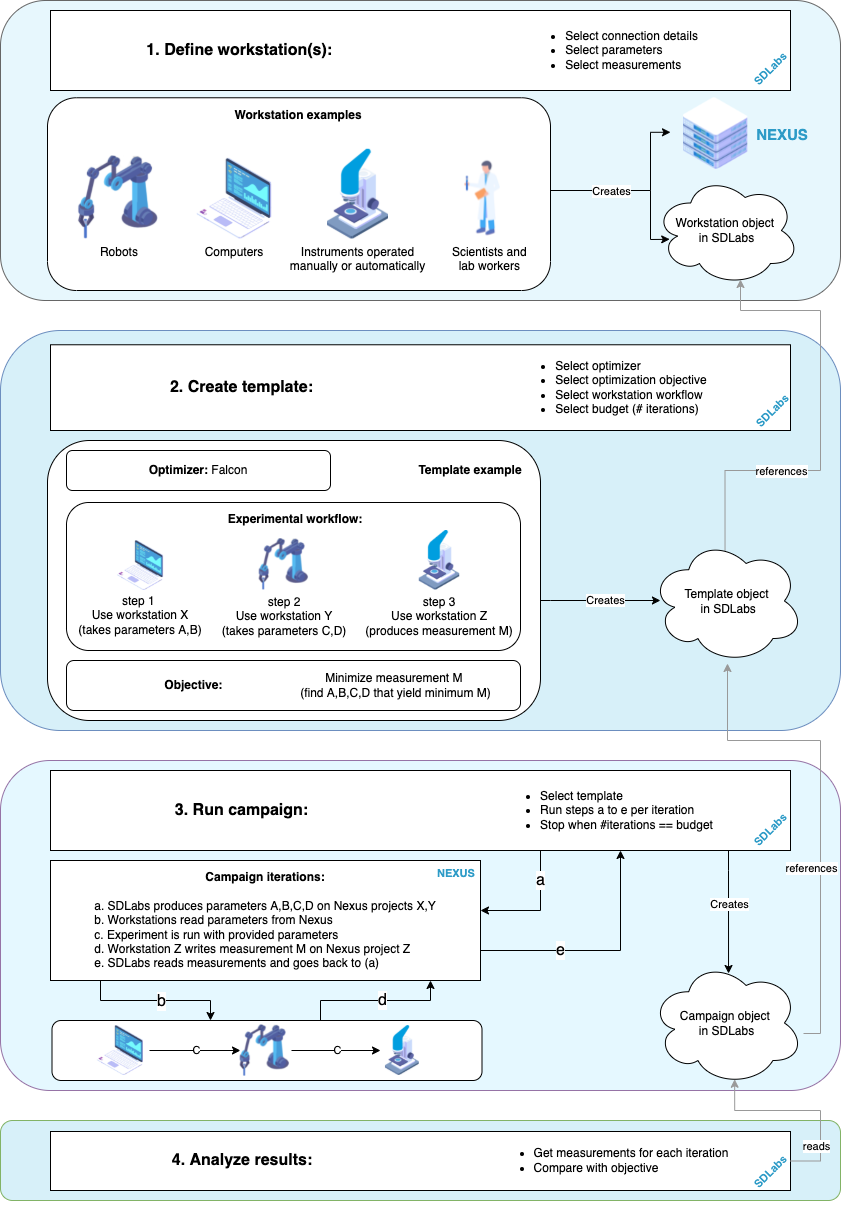
A typical optimization process can be defined and executed on SDLabs and Nexus by following 4 main steps:
- Define your workstation: Here is where you define each unit of your operation. A workstation can be an instrument, a robotic process, a computer, a scientist, etc. If needed, this process will also create an empty Nexus project where your workstation can exchange files with SDLabs.
- Create a template: Define the steps of your experimental workflow referencing the workstations created in the previous step, the objective you want to optimize and the algorithm of your choice.
- Run a campaign: Execute the workflow defined in the template for a given number of iterations. SDLabs will suggest new parameters through Nexus at every iteration after having learnt from previous measurements. You can define the maximum number of iterations as the budget of your template.
- Analyze results: You can observe the progress of your measurements with the Analytics module. You can create charts and reports of your experiments.
The following figure gives more details on each of the steps:
Glossary
Contains insights on different terminologies used.
Optimizers
Provides additional information about the different ML algorithms offered by the SDLabs platform.
Surfaces
Provides information about the built-in workstations that SDLabs offers.
Next steps
GUI
Please refer to the end-to-end tutorial of SDLabs graphical user interface, where you will learn how to create and execute the above workflow: SDLabs GUI Tutorial.
SDK
- Head over to the SDK tutorial section.
- Head over to the Nexus tutorial to learn how to integrate your workstation in SDLabs.
- As you go over the tutorials, please keep an eye on the API documentation, which contains much more detailed information on method calls and schemas.