Quickstart: run a Campaign

Notebook overview
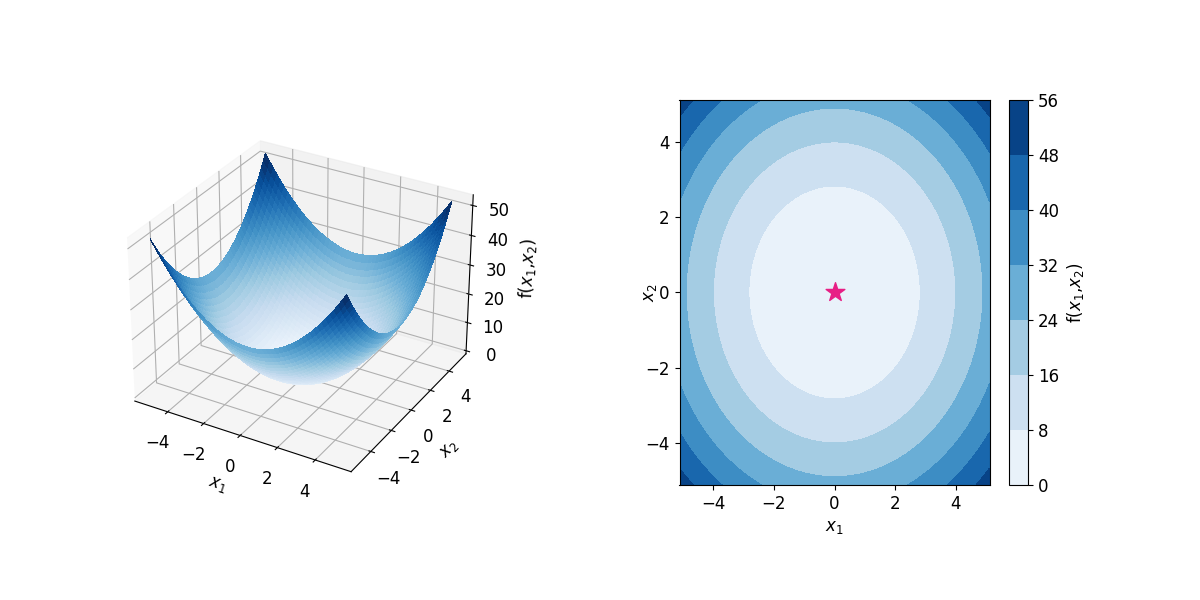
This tutorial uses SDLabs Scientia to perform an optimization of the 2-dimensional Dejong surface (here treated as a workstation). Let's say you have an experiment to optimize, your inputs are the parameters of this Dejong function, while the measurements that your experiment would yield are the corresponding point of the Dejong surface. The Dejong surface contains a single global minimum at x_0, x_1=0.5 indicated by a blue star at the center of the figure below.
Objective
This example creates a simple template named dejong_template that contains the following:
- two input parameters (
param_aandparam_b) - one objective to be minimized (
measurement) - one workstation which emulates the
Dejongfunction.
Configure API and authorization
Important
- Enter your Atinary API Key in the indicated location. You can generate one in your dashboard.
- Change
hostaccording to the API Endpoints.
# import dependencies
import time
from pprint import pprint
import scientia_sdk as sct

API_KEY = "####"  # Add your API-KEY here
SDLABS_ENDPOINT_URL = "####"  # as defined in API Endpoints

configuration = sct.Configuration(
    host = SDLABS_ENDPOINT_URL,
    api_key = {
        'api_key': API_KEY,
    }
)
configuration.access_token = None  # temporary fix when using the SDK
Make an instance of the API client
First, let's create an instance of the SDLabs ApiClient using the configuration defined in the previous cell. Then, we create api instances for each of the tools we need to set up our experimental template.
Api Instances
# instance of ApiClient
sdlabs_api_client = sct.ApiClient(configuration)

# Create the necessary API objects
# manage workstations
wst_api = sct.WorkstationApi(sdlabs_api_client)

# manage parameters
prm_api = sct.ParameterApi(sdlabs_api_client)

# manage optimizers
opt_api = sct.OptimizerApi(sdlabs_api_client)

# manage objectives
obj_api = sct.ObjectiveApi(sdlabs_api_client)

# manage templates
tpl_api = sct.TemplateApi(sdlabs_api_client)

# manage campaigns
cpg_api = sct.CampaignApi(sdlabs_api_client)
Select optimizer algorithm
The optimizer algorithm recommends parameter points to be input and measured by the workstation. Let's select Dragonfly, a Deep Bayesian optimizer which makes recommendations informed by all previous measurements.
All available optimizers may be found here.
WANTED_OPT = "Dragonfly"  # See 'Optimizers' page for a list of available optimizers
my_opt = next(opt for opt in opt_api.optimizers_list(is_public=True).objects if WANTED_OPT == opt.name)

print(my_opt)
Using an existing workstation
As the optimizer makes recommendations of parameter settings to be measured, we need a way to evaluate these parameters and record the resulting value from the experiment.
We provide a workstation emulator for the 2-dimensional Dejong surface that can be accessed as described below.
All available surfaces can be found here.
WANTED_WST = "Dejong"  # See 'Surfaces' page for a list of available Workstations examples
my_wst = next(wst for wst in wst_api.workstations_list(is_public=True).objects if WANTED_WST == wst.name)

print(my_wst)
Custom workstation
If you created a custom workstation (see API-connected workstations or Nexus custom workstations tutorials) then you should already have the workstation object available. If so, skip this step. Otherwise, enter the workstation name below, and make sure that the is_public flag is set to False.
Create template parameter space
Next we must create parameters which, combined together, make up a parameter space in which the optimizer is allowed to query for measurements. The Dejong surface (i.e. our current workstation) has 2 continuous parameters, param_a and param_b, which are characterized by a name, an upper bound and a lower bound set to [0,1].
Warning
Please note that names given to these parameters must match those of the workstation's parameters, as well as their type. Also, the template parameters bounds should not exceed the workstation's parameters bounds.
Tip
If you wish to simply copy workstation parameters, you can use the prm_api.parameter_copy functionality below, instead of creating a new parameter.
param_a = prm_api.parameter_create(
    parameter_obj = sct.ParameterObj(
        name='param_a',
        description='parameter description',
        high_value=1.0,
        low_value=0.0,
        type='continuous',
    )
).object

param_b = prm_api.parameter_copy(
    param_a.id,
    parameter_copy=sct.ParameterCopy(name='param_b'),
).object

print(param_a)
print(param_b)
Custom workstation
If you created a custom workstation (see API-connected workstations or Nexus custom workstations tutorials) you have to create copies of the workstation parameters for your template (using prm_api.parameter_copy(...)).
Create the objective
An objective is the goal for one measurement of the optimization procedure. It can be to minimize, to maximize, or to reach a specific value (e.g. for pH: target = 7.0), which the optimizer will reach by tuning the parameters. Here, our objective is the dejong measurement from the Dejong workstation, and the optimization goal is to minimize it.
Warning
The objective name must match the corresponding workstation measurement's name and is case-sensitive.
my_objective = obj_api.objective_create(
    objective_obj=sct.ObjectiveObj(
        name='dejong',
        description='2d continuous dejong surface',
        goal=sct.Goal.MIN,  # can be MIN, MAX, TARGET (if "TARGET" goal is set, the argument "target" must be set with a numerical value)
    )
).object

print(my_objective)
Create the template
A template is a complete agglomeration of the components necessary for an optimization procedure. It includes one or more workstations, one or more objectives, an optimizer, the template's parameters, some metadata (budget, name, etc.) and may optionally contain constraints. Let's define a template for our simple 2D Dejong surface example.
Please note that you may encounter server errors if you modified some inputs from this tutorial, or duplicated parameters, objectives and/or campaigns. The easiest solution is to restart this tutorial from the step "Create template parameter space".
Warning
- Names of the parameters given in the template must match the corresponding workstation parameters names.
- Names of the objectives given in the template must match the corresponding workstation measurements names.
my_tpl = tpl_api.template_create(
    template_obj=sct.TemplateObj(
        # budget: total number of objective function measurements allowed
        budget=5,
        # define optimizer
        optimizer=my_opt.id,
        # name of the optimization template
        name='dejong_template',
        # define the objective
        objective=my_objective.id,
        # define the parameters for each workstation
        parameters=[
            sct.StepObj(
                level=1,
                parameters=[
                    sct.ParameterCpgObj(
                        parameter_id=param_a.id,  # Copy of the workstation's parameter / parameters names should match!
                        workstation_id=my_wst.id,
                    ),
                    sct.ParameterCpgObj(
                        parameter_id=param_b.id,  # Copy of the workstation's parameter / parameters names should match!
                        workstation_id=my_wst.id,
                    ),
                ],
            )
        ],
    )
).object

print(my_tpl)
Launch the template as a campaign
Now that we have defined our template, it is time to start the autonomous experiment! First, we will create a new campaign from this template.
Next, we will wait until the campaign has terminated by using time.sleep. During this time, our optimizer (Dragonfly) will recommend parameters, that will be processed and measured by the Dejong workstation. This closed-loop will continue until the experimental budget is consumed.
# create campaign
my_campaign = tpl_api.template_run(
    my_tpl.id,
    template_run_obj=sct.TemplateRunObj()
).object

print(my_campaign)
# wait until the campaign running is finished
running = True
while running:
    # Get campaign info
    cpg_status = [
        tmp
        for tmp in cpg_api.campaigns_state(campaign_ids=[my_campaign.id]).objects[0].campaigns
        if tmp.id == my_campaign.id
    ][0]

    if cpg_status.state in ['terminated', 'stopped']:
        running = False
    else:
        print(f'Campaign "{cpg_status.id}" with name "{cpg_status.name}" is running iteration {cpg_status.stats.running} out of {cpg_status.stats.budget}, status: {cpg_status.status.status}')

    # Checks campaign status.
    if cpg_status.status.status != 'ok':
        print(f'Campaign "{cpg_status.id}" with name "{cpg_status.name}" failed at iteration {cpg_status.stats.running} with ')
        cpg = cpg_api.campaign_get(campaign_id=my_campaign.id).object
        # formatting campaign events and errors:
        print(f'{", ".join(evt.type + ": " + evt.message + " (" + evt.date_time[:19] + ")" for evt in cpg.status.events)}.')

    time.sleep(5)

# print my campaign result
pprint(cpg_api.campaigns_results(campaign_ids=[my_campaign.id]))
Dependencies schematic
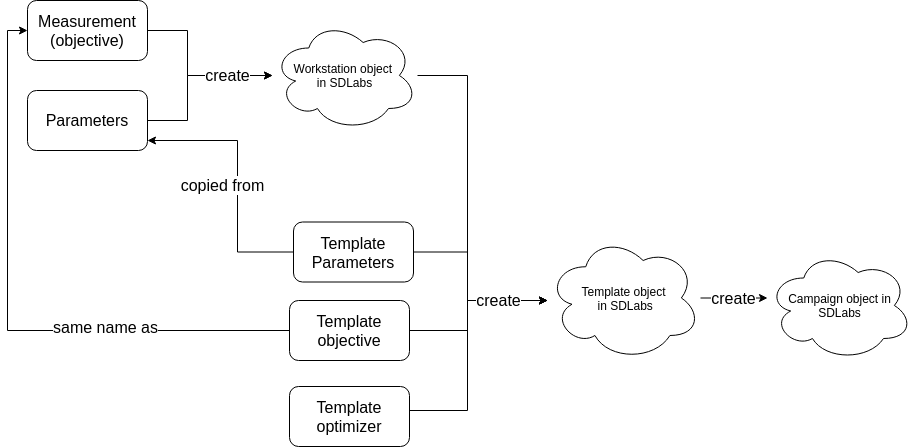
The following diagram summarizes the steps we have accomplished.
- Workstations require measurements and parameters.
- Templates require template parameters, a reference to the used workstations, an objective (possibly multiple), and an optimization algorithm.
- A campaign is a snapshot of a template definition at a given time.
Tip
- You can also have detailed descriptions of the api methods in the API documentation.
- With the Enterprise version, you can run multiple campaigns at the same time, and your proposals are not delayed!
Important notes
Update restrictions
- Once a template uses a workstation and at least one campaign has been started, it is no longer possible to add or remove parameters or measurements from the workstations.
- Once at least one campaign has been started from a template, it is only possible to update the template's objectives, parameter ranges, constraints, budget, and the optimizer (please note that when doing so, previously started campaigns will not be modified, the new configuration will apply on the next campaigns).
Next steps
You are now ready to create your custom workstation:
- follow the API-connected workstations tutorial to create a workstation that you will run and manage via API; or
- follow the Nexus custom workstations tutorial to create a workstation that will use
Nexusfile exchange (in that case, once you have successfully launched a campaign with your custom workstation, head over to the Nexus tutorial).